
Customizable Website Widgets for GEO Insights and Lead Generation
Website Widgets let visitors start an initial GEO assessment from your site. Customize the experience, review widget-sourced scans, and selectively run full scans when deeper investigation is needed.
We have introduced customizable Website Widgets in GEO Search Leads, giving agencies, consultants, and website service providers a way to offer an initial GEO assessment directly on their own websites. Visitors can enter a website URL and start a scan without leaving your page, creating a natural starting point for conversations about website readiness and possible next steps.
Offer an initial GEO assessment on your website
A Website Widget adds a visitor-facing scanning experience to your site. Rather than directing someone away from your website to begin an assessment, you can embed the widget where it fits your existing journey, such as a service page or consultation page.
Visitors enter a website URL and start an initial scan. The results can show a total score and individual category scores, depending on the detail you choose to display. These scores provide an initial assessment of GEO readiness. They are not a measurement or guarantee of actual visibility in AI answers.
This distinction makes the widget useful for opening an informed discussion. A visitor can see an initial assessment, while you can decide whether the website is worth a deeper review through a full report.
Customize the experience for your audience
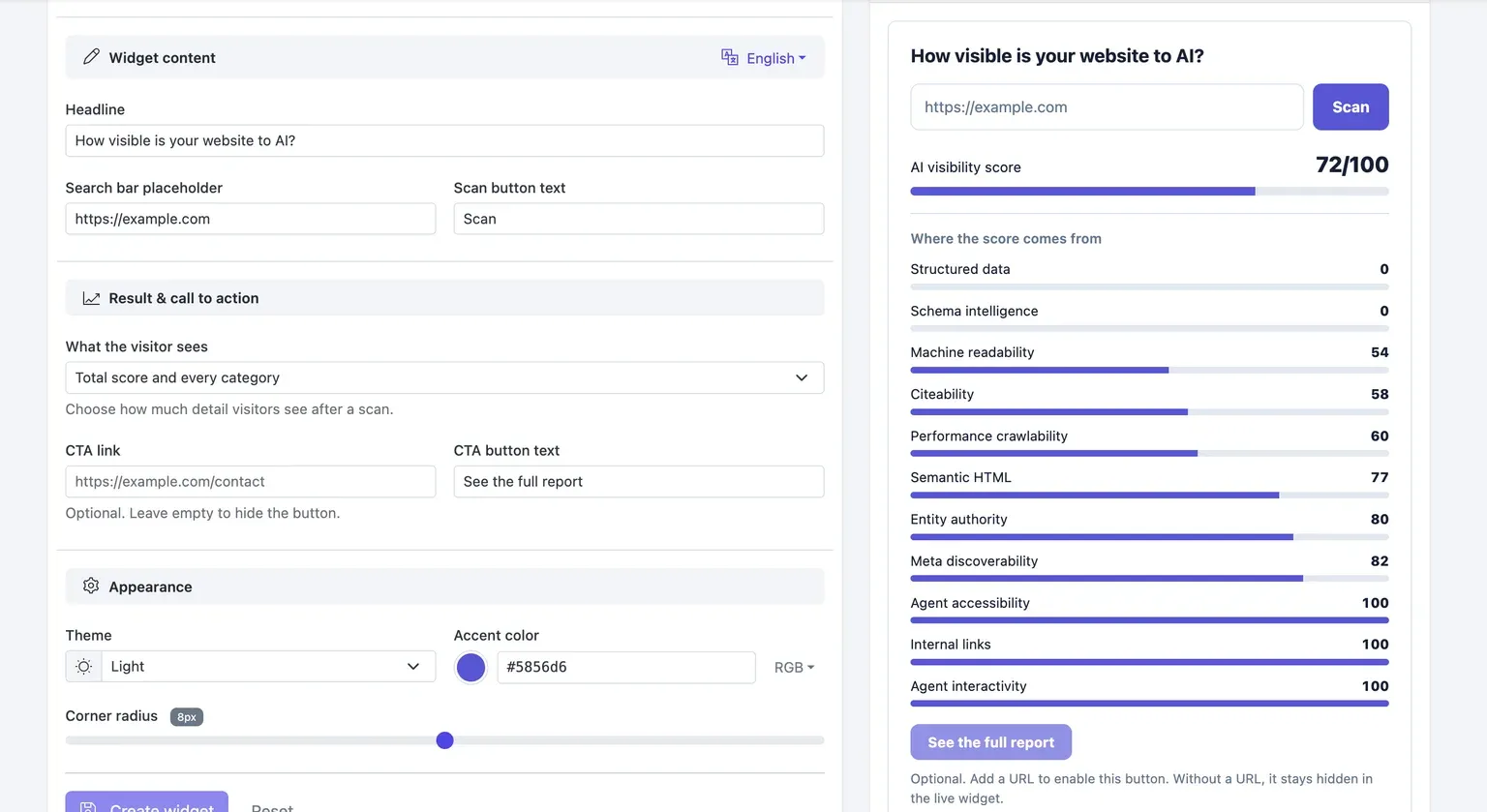
The widget builder gives you control over both its copy and appearance. You can set the headline, URL input placeholder, and scan button text so the experience matches the language on your website. A widget name is also required for your own reference, but visitors do not see that internal name.
You can also choose the level of result detail shown after an initial scan. The builder supports the total score and individual category scores, allowing you to decide how much context visitors receive at this stage.
For visual consistency, adjust the theme, accent color, and corner radius. The Search bar and Score preview views let you review the input state and the results presentation before embedding the widget. Preview scores are illustrative builder values, not promised results or evidence of visibility across AI platforms.
Add an optional next step
You can add a result CTA that directs visitors to a destination you choose, such as your contact page. Set both the destination URL and the CTA button text to fit the next step in your visitor journey. For example, a button labeled “Discuss your results” can connect an initial assessment with a relevant conversation.
The CTA is optional. If you leave the CTA URL empty, the result button remains hidden in the live widget. This allows you to use the assessment experience without adding a follow-up button.
Create and embed a widget
Use the builder to configure the visitor experience, review its presentation, and place it on your website.
- Open Website Widgets in your dashboard and select New widget.
- Enter a widget name for your own reference. Visitors will not see this name.
- Customize the visitor-facing content by setting the headline, search bar placeholder, and scan button text.
- Choose the result detail visitors should see. You can show the total score and individual category scores.
- Optionally add a CTA link and CTA button text. Choose a destination that supports your visitor journey, such as a contact page. Leave the CTA URL empty if you do not want a result button.
- Adjust the theme, accent color, and corner radius to match your website. Use the Search bar and Score preview views to review the input and results presentation.
- Select Create widget, then use the provided embed code to place the widget on your website.
- Visitors can enter a website URL and start an initial scan. These scans do not consume scan credits, although rate limiting applies.
Review visitor activity and identify its source
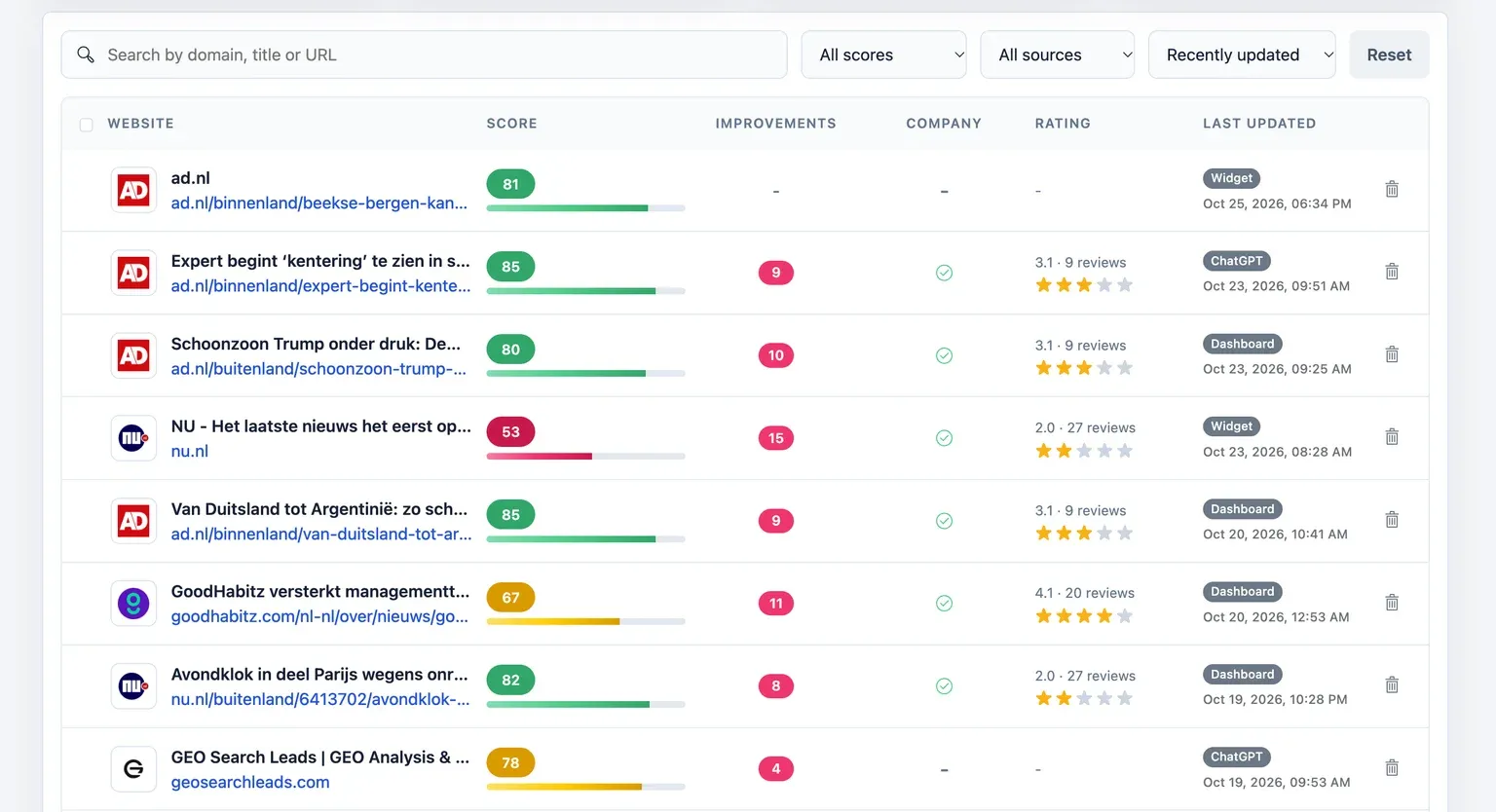
Widget scans appear in your dashboard and are marked with the Widget source label. This makes it easier to distinguish visitor-initiated activity from scans started through the dashboard, ChatGPT, or the API. The Latest scans view in Website Widgets provides another place to review scans started by visitors.
This source information supports a practical review workflow. You can look at incoming assessments, see which websites are being checked through your site, and determine which ones warrant further investigation. The widget itself does not automatically identify every visitor, capture email addresses, or create qualified leads. It provides an initial assessment that you can connect to your own conversation flow.
Choose when to run a full scan
An initial widget scan is not the same as a full website scan. It is designed to give visitors an initial GEO assessment without consuming your scan credits. If a widget-sourced result needs deeper investigation, you choose whether to run a full scan.
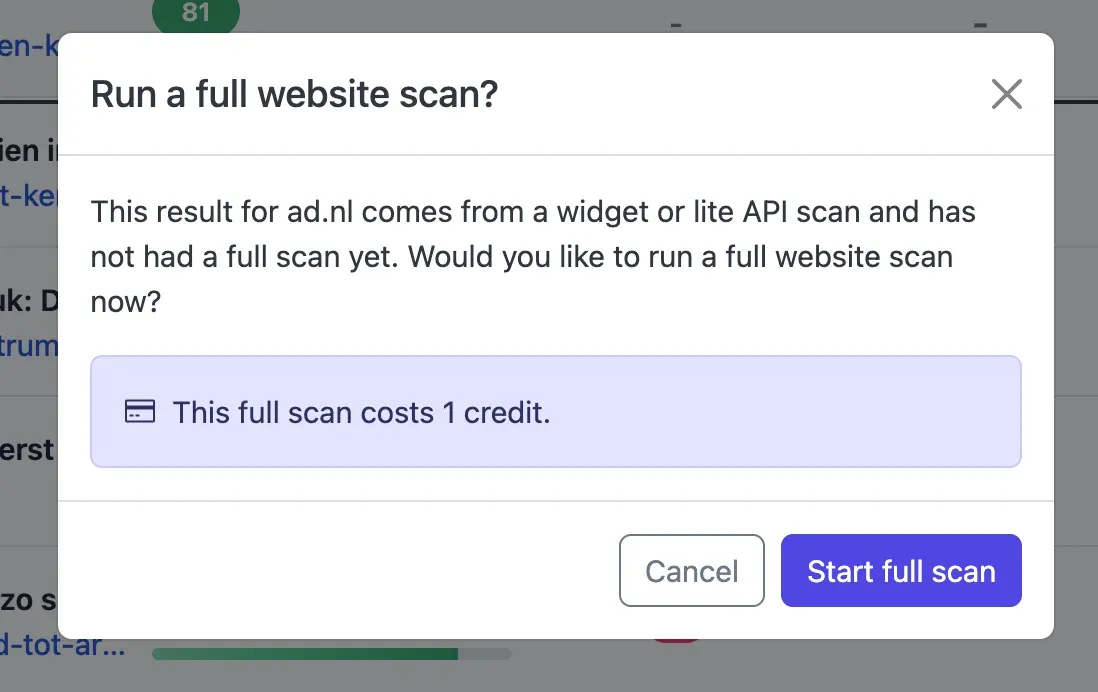
To do this, click the result's dashboard row. If that website has not already had a full scan, a confirmation dialog appears. The dialog states that the full scan costs 1 credit. Select Start full scan to proceed, or select Cancel to keep the result as an initial assessment.
A full scan is optional. It is not started or charged simply because a visitor uses the widget, views an assessment, or because you open the confirmation dialog. When you do choose to run one, the full report provides the deeper insights and lead data available through a full scan.
Use widgets alongside report conversations
The intended workflow is straightforward: offer an initial assessment on your website, review widget-sourced activity in your dashboard, and selectively use a credit for a full scan when a website deserves further attention. This gives you control over when deeper investigation occurs while allowing regular visitor use of the initial assessment.
Widget scans do not consume scan credits. Rate limiting still applies to protect the service from abuse. The feature is intended for regular visitor use rather than only a small number of demonstrations, and volumes of 500 or more scans per day can be accommodated subject to that rate limiting. This is not a fixed daily allowance or a guarantee of unrestricted throughput.
For report review, the MCP integration provides an on-demand conversational option through a connected MCP-compatible AI chatbot. For example, during a daily review, you can retrieve recent reports and ask questions about their findings. This is a conversational workflow, not an automatic daily notification or scheduled monitoring feature.
To configure a visitor-facing assessment for your own website, create an account.
Frequently Asked Questions
What can visitors do with a Website Widget?
Visitors can enter a website URL and start an initial GEO scan directly from the page where you embed the widget. You decide which result details to show, including the total score and individual category scores. The assessment is an initial readiness view, not a guarantee of visibility in AI answers.
Which parts of the widget can I customize?
You can customize the headline, URL input placeholder, scan button text, theme, accent color, and corner radius. You can also choose whether visitors see the total score and category scores. The builder includes Search bar and Score preview views for reviewing the presentation before you embed it.
Do widget scans consume scan credits?
No. Initial scans started through a widget do not consume scan credits. Rate limiting applies to protect the service from abuse, and volumes of 500 or more scans per day can be accommodated subject to those limits. This does not represent a fixed allowance or unrestricted throughput guarantee.
What happens if I want to investigate a widget result further?
Open the widget-sourced result from its dashboard row. If it has not received a full scan, a confirmation dialog will explain that a full scan costs 1 credit. You can select Start full scan for deeper insights and lead data, or Cancel to leave it as an initial assessment.
What happens when I leave the CTA URL empty?
The result CTA button stays hidden in the live widget when its destination URL is empty. You can therefore offer the initial assessment without a follow-up button, or add a destination and button label when you want to guide visitors to a relevant next step, such as a contact page.
Conclusion
Website Widgets help you place an initial GEO assessment within your own website journey, then separate visitor interest from the deeper investigations you choose to pursue. With configurable presentation, source-labeled activity, and an optional credit-based full scan, the workflow supports more deliberate follow-up conversations around website readiness.